How to save an HLS (M3U8) stream as an MP4 on Android
An .m3u8 link isn't a video file. It's a playlist that points to hundreds of short parts, which is why a normal download gives you a tiny text file. To keep the video you need an app that reads the playlist, fetches every part and joins them into one file.
- Open the page with the video in AuronDM and press play.
- Tap the download button that appears at the bottom. It says how many media files were found.
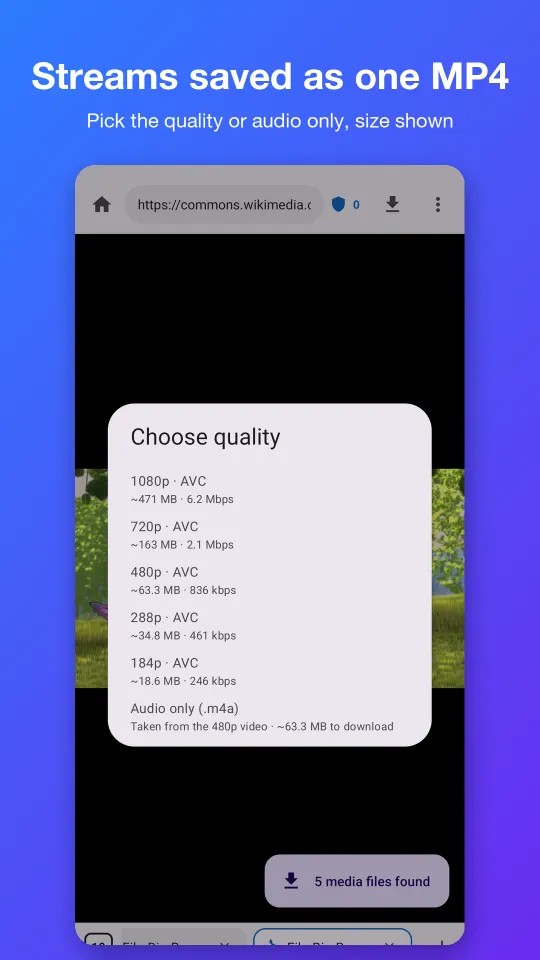
- Choose a quality, then download. You get one MP4 that plays offline.
What an M3U8 link really is
HLS (HTTP Live Streaming) is how most sites send video today. The video is cut into parts a few seconds long, and a playlist file ending in .m3u8 lists them in order. Often there is a first playlist that only lists the qualities (360p, 720p, 1080p), each with its own playlist of parts, and sometimes the sound is a separate stream.
So saving a stream takes four steps: read the playlists, pick a quality, download every part, and join the parts with the sound into one file. A phone's built-in downloader does none of this. It saves the playlist itself, a text file of a few kilobytes.
Save a stream from the page you're watching
- Open the page in AuronDM. Type the address, or share the link to AuronDM from another app.
- Press play. Many pages only load the stream once the video starts.
- Tap the download button at the bottom of the screen. The list shows each video found, named after the page, with its length and size when the site gives them.
- Choose a quality. Each one shows details such as resolution, codec and an estimated size. If the stream has several audio languages, pick one here too.
- Download. AuronDM fetches the parts and joins them. The result is usually a single MP4 in your Download/AuronDM folder, and it opens in the built-in player or any other player.
If you already have the .m3u8 link
Open Downloads, tap Add link and paste the link. AuronDM reads the playlist and asks for the quality, the same as above. If you paste the address of a web page instead, it opens in the browser, where the videos on it are found.
Subtitles, and audio only
- Subtitles: when a stream carries them, tick Also save subtitles. They are saved as a
.vttfile with the same name as the video, which most players load by themselves. - Audio only: choose Audio only (.m4a) to keep just the sound, for a talk or a lecture. The file is far smaller than the video.
When a stream can't be saved
| What you see | Why |
|---|---|
| No download button | The video hasn't started yet, or the site's terms don't allow downloading and it isn't supported. |
| The stream is protected | DRM-protected streams are encrypted for the player only. They can't be saved by any downloader that follows the rules. |
| It's a live broadcast | A live stream has no end, so there is no complete file to save. |
| "Link expired" part-way | Many sites give links that work for a short time. See how to carry on with a refreshed link. |
Why streams download one part at a time
A normal file can be split across many connections. A stream is already split into parts by the site, so AuronDM downloads them in order and joins them at the end. Speed then depends mostly on your connection and on the site.
Try it on your phone
AuronDM is a browser with an ad blocker and a download manager, for Android 10 and later. No account needed.
Get it onGoogle PlayResponsible use. Only download content you own or have permission to download. Sites whose terms forbid downloading are not supported, and DRM-protected or live streams can't be saved.
More guides
- Resume an interrupted downloadCarry on from where a download stopped, even after the link has expired.
- Download large files fasterWhat multi-connection downloading does, and when it helps.
- Block ads and pop-up redirectsHow ad blocking in a browser works, and how to allow the sites that need ads.
- Download multiple links at oncePaste up to 30 links, or send them from another app, and let the queue do the rest.