How to download multiple links at once on Android
A list of files to download, such as lecture recordings, a photo set or software images, usually means opening each link, waiting, and coming back for the next one. A download manager takes the whole list at once and works through it.
- Copy your links, one per line.
- In AuronDM open Downloads and tap Add link.
- Paste up to 30 links and tap Download.
Paste a list of links
- Collect the links in a note, an email or a chat, one per line.
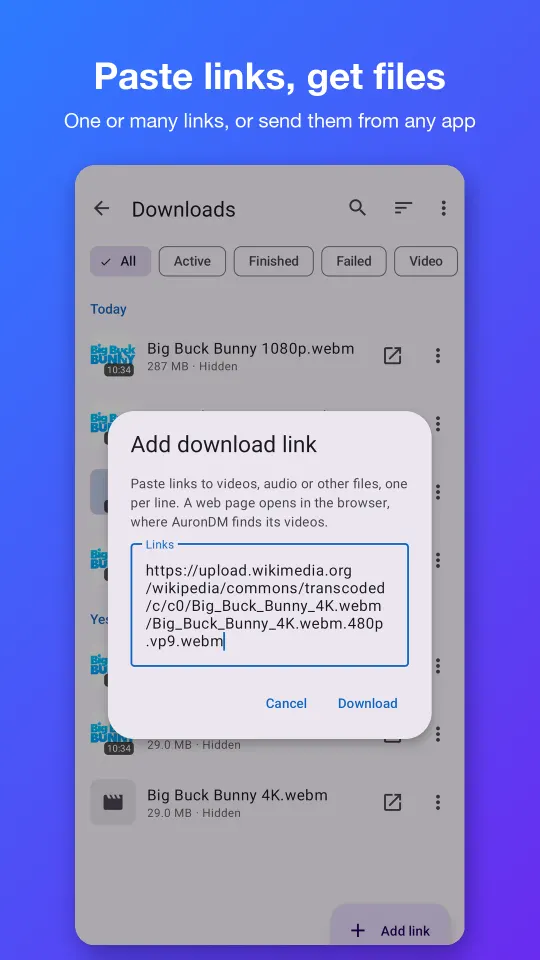
- Open Downloads in AuronDM and tap Add link.
- Paste. Up to 30 links are taken at a time.
- Tap Download. Each link is checked first, and you see a summary: how many were added, how many are already in your list, and which ones didn't work and why.
A link to a web page, not to a file, opens in the browser instead, where AuronDM finds the videos on it.
Send links from other apps
You don't have to copy and paste:
- Share: in any app, tap Share on a link and choose AuronDM.
- Select text: select a link in a message or document and choose Download with AuronDM from the menu.
- Long-press: in the AuronDM browser, long-press a link or an image to download it.
Manage the queue
On the free plan AuronDM downloads one file at a time and queues the rest, so each file gets your full speed. The queue is yours to arrange:
| Action | What it does |
|---|---|
| Start now | Starts this download ahead of the others |
| Move to top | Puts it first in the queue |
| Download later | Adds it paused, to start when you choose |
| Resume all | Carries on with everything that was paused or interrupted |
| Retry failed | Tries every failed download again |
If a link is already in your list, or the file is already on your phone, AuronDM warns you before adding a duplicate.
Large batches overnight
- Leave Download over Wi-Fi only on, so the queue waits when Wi-Fi drops and doesn't use mobile data.
- Plug the phone in. Android limits background work on a low battery.
- If something stops the queue, nothing is lost. See how to resume an interrupted download.
What Pro adds
Everything above works without paying. AuronDM Pro, a monthly subscription through Google Play, adds several downloads at the same time, batch downloads of the videos or file links found on a page, and repeating schedules. The app shows the price before you buy.
Try it on your phone
AuronDM is a browser with an ad blocker and a download manager, for Android 10 and later. No account needed.
Get it onGoogle PlayResponsible use. Only download content you own or have permission to download. Sites whose terms forbid downloading are not supported, and DRM-protected or live streams can't be saved.
More guides
- Save an HLS (M3U8) stream as one MP4Why a stream is hundreds of small parts, and how to get one file that plays offline.
- Resume an interrupted downloadCarry on from where a download stopped, even after the link has expired.
- Download large files fasterWhat multi-connection downloading does, and when it helps.
- Block ads and pop-up redirectsHow ad blocking in a browser works, and how to allow the sites that need ads.